Context engineering for AI agents: runtime lifecycle guide
Design an AI agent's runtime context lifecycle across instructions, retrieval, tool results, history, memory, compaction, owners, expiry, and evaluation.
Written by Dali
Dali is an AI agent systems studio. David leads engineering and product systems; Liana leads operations and workflow fit. We ship production agents inside tools teams already use.
David Hakobyan · LinkedIn · Dali

Context engineering for AI agents is the work of deciding, each turn, which tokens enter the model window, who owns them, when they expire, and how you prove that set still steers the agent correctly. It is not "write a longer system prompt." If you treat the prompt as the whole system, production agents drift as tool dumps, stale policies, and chat history crowd out the few facts that matter.
Anthropic frames the discipline as curating the optimal set of tokens during inference under real architectural limits (Effective context engineering for AI agents). This page turns that framing into a runtime lifecycle you can operate: instructions, retrieved knowledge, tool results, conversation history, memory, compaction, and evaluation.
It is a design guide for production systems, not a vendor bake-off. For the broader production bar around tools, gates, and ownership, start with what a production AI agent is.
Context engineering vs prompt engineering
Prompt engineering focuses on how you write and structure instructions so the model behaves well on a task. Context engineering manages the full working state that lands in the window: system instructions, tool definitions, retrieved documents, message history, tool results, and anything reloaded from memory (Anthropic).
Recommendation: version the instruction text like product code, but design a separate lifecycle for every other token class. How you ship prompt and schema changes belongs on versioning prompts and agent rollouts. How you chunk corpora and keep citations fresh belongs on RAG, memory, and grounding. This page owns the runtime assembly problem: what is in the window right now, and why.
Why the window is a scarce resource
Larger context windows do not cancel the need for curation. Anthropic treats context as a finite resource with diminishing marginal returns: every extra token competes for attention, and longer windows can still reduce precision on what matters (Anthropic). Chroma's context-rot research reports the same directional pattern across controlled tasks: performance often degrades as input length grows, even when the underlying task stays simple (Chroma).
Do not invent a single "safe token count" for every model. Recommendation: design for a small high-signal working set, then add retrieval, memory, and compaction controls before you rely on a bigger hard limit.
The context lifecycle to design
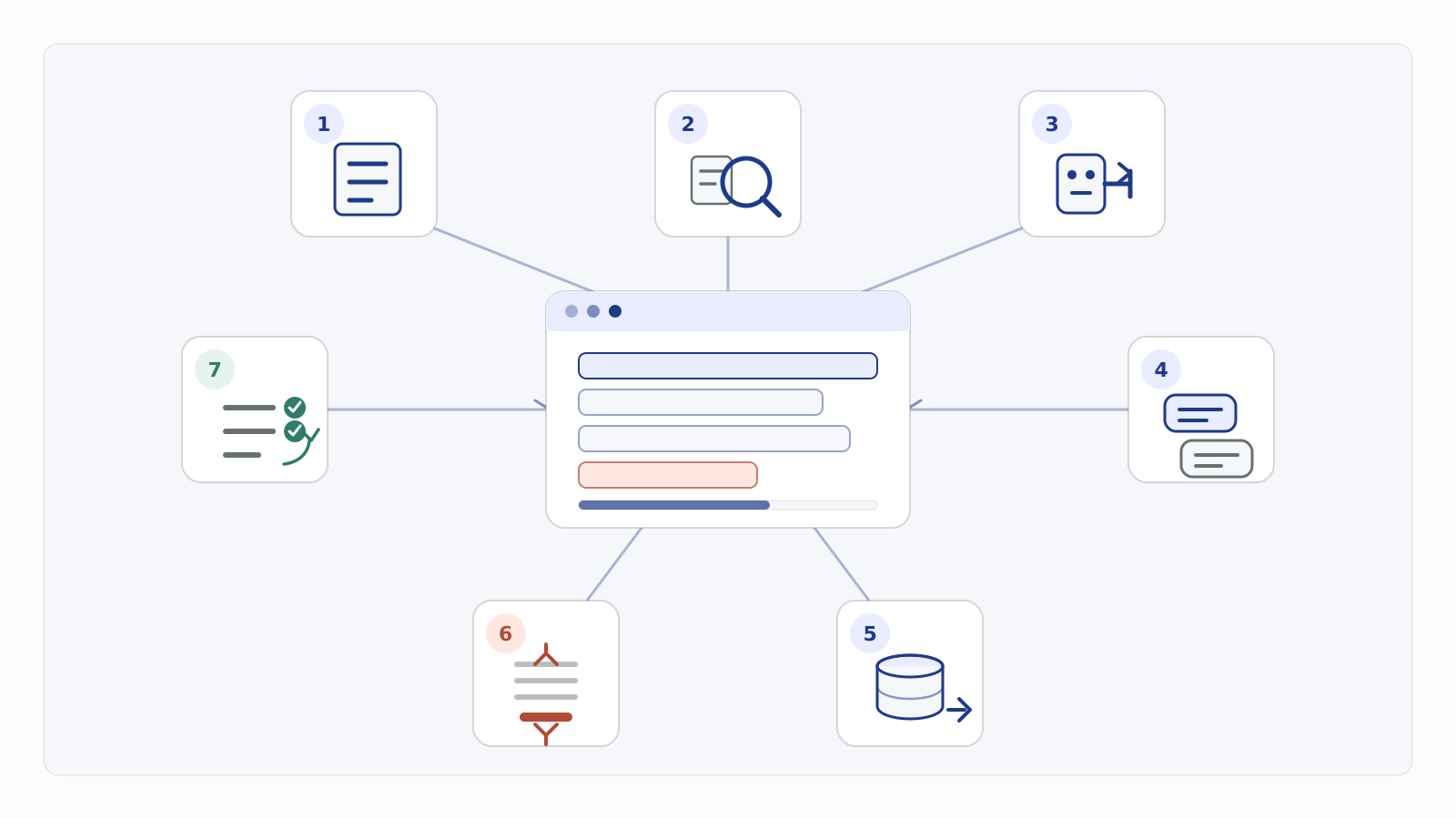
Language-neutral lifecycle: durable instructions and tool contracts at boot, per-turn retrieval and tool I/O, history growth, external memory, compaction under pressure, and evaluation as the control loop.
A production agent does not load one static blob. It assembles context repeatedly while it loops on tools.
Use seven lanes:
- Instructions - system prompt, policy, output contracts, tool guidance.
- Retrieved knowledge - documents, rows, or snippets loaded for the current goal.
- Tool results - payloads returned from CRM, search, files, APIs.
- Conversation history - user and assistant turns still inside the active window.
- Memory - notes or state stored outside the window and reloaded on purpose.
- Compaction - lossy summaries or clearances that free budget while preserving continuity.
- Evaluation - the evidence you keep so you know the assembly still works after changes.
Anthropic's long-horizon toolkit centers on compaction, structured note-taking, and sub-agent isolation when a single window is not enough (Anthropic). Claude platform docs and cookbooks separate whole-transcript compaction, tool-result clearing, and memory as different controls for different kinds of growth (Compaction docs; Context engineering cookbook).
A compact vocabulary for the lifecycle is write, select, compress, and isolate. Write durable notes outside the active window, select only relevant retrieval and tool output, compress history when pressure rises, and isolate exploration in another worker when it would overwhelm the main run.
Lane by lane
Instructions
Load a minimal, clear instruction set at run start. Anthropic recommends a "right altitude": specific enough to guide behavior, flexible enough to avoid brittle if-else pseudo-code (Anthropic). Put durable policy here. Do not paste an entire knowledge base into the system prompt.
Owner: product engineering with ops on business rules. Expiry: only when a new version ships. Ship through review and canary, not live edits (versioning prompts).
Retrieved knowledge
Prefer just-in-time retrieval: keep identifiers (paths, IDs, queries) and load only what the step needs (Anthropic). That is different from pre-stuffing every possibly related document before the first token.
Owner: knowledge or domain owner for corpus truth; runtime for retrieval policy. Expiry: drop chunks when the step ends unless a citation must stay for the final answer. Chunking, grounding, and freshness mechanics live on the RAG and grounding page.
Tool results
Tool results are often the largest and noisiest growth source. Anthropic's tool-writing guidance is direct: return high-signal fields, cut low-level noise, and expose concise versus detailed response shapes when agents need either control (Writing effective tools). Recommendation: design tools so the default reply is re-fetchable and small; keep full dumps behind an explicit detail mode.
For long runs, tool-result clearing can drop old re-fetchable payloads while keeping the fact that the call happened (Cookbook). Permission and write-safety rules for tools are separate; see safe tool calling.
Conversation history
History is the live transcript: user goals, clarifications, assistant plans, and prior decisions still needed for coherence. It grows every turn. It is not a substitute for durable memory or for approved policy text.
Owner: agent runtime and product design for retention UX. Widget sessions that reset on close need explicit product rules (session context in chat widgets).
Memory (structured notes outside the window)
Memory is external state the agent writes and later reads: progress notes, open decisions, checkpoints, user preferences that should survive a reset (Anthropic; Cookbook). It is not a junk drawer for secrets or other tenants' data.
Owner: platform for storage isolation; product for what may be stored. Expiry: task notes die with the task; preferences follow a declared retention policy.
Compaction
Compaction summarizes older context and continues from that summary when the window is under pressure (Anthropic).
On the Claude Messages API, server-side compaction is currently a beta context-management edit (compact_20260112).
Documented defaults use an input-token trigger of 150,000 tokens, with a minimum trigger of 50,000 (Compaction docs).
Those numbers are platform defaults, not a universal production law for every model or stack.
If you supply custom summarization instructions, Claude docs state they replace the default prompt entirely rather than merging with it (Compaction docs). Recommendation: write compaction instructions that preserve open decisions, identifiers needed for tool calls, and unresolved risks, then probe whether those survive after a compact.
Evaluation
Evaluation is the lane that keeps the lifecycle honest. You need cases that fail when the wrong tokens enter, the right tokens expire early, or compaction drops a decision that later steps need. Build that harness with a golden set and outcome graders (evaluate before go-live). Observability tells you what the run actually saw; it does not replace the lifecycle design (agent observability).
Context lane decision table
| Lane | What enters | When it enters | Who owns it | Expiry rules | Evaluation evidence |
|---|---|---|---|---|---|
| Instructions | System prompt, policy, output contract, tool guidance | Run boot; reload only on version change | Product eng + ops for rules | Expire only via versioned release | Instruction version id on the run; regression suite after prompt edits |
| Retrieved knowledge | Approved chunks, records, or snippets for the current goal | Per turn or per tool step when the goal needs them | Knowledge owner (truth) + runtime (retrieval policy) | Drop after step unless needed for final citations; re-fetch after corpus publish | Retrieval hit checks on golden questions; stale-document traps |
| Tool results | Structured tool outputs (status, fields, errors) | Immediately after each tool call | Platform / tool author for shape; runtime for retention | Clear or truncate old re-fetchable results; keep recent keep-window; never retain secrets | Tool-result size caps; re-fetch after clear still succeeds; error-shape tests |
| Conversation history | User and assistant turns still needed for coherence | Every turn | Runtime + product (retention UX) | Trim after compaction; hard reset ends session history | Multi-turn continuity cases; reset-behavior product tests |
| Durable memory notes | Progress notes, open decisions, approved preferences | Written during work; reloaded on new session or after compact | Platform (store/isolation) + product (allowed fields) | Task notes end with task; preferences follow retention policy | Cross-session resume cases; isolation tests for multi-tenant data |
| Compaction summary | High-fidelity summary of prior window state | When token budget hits a configured trigger | Runtime owner of compaction policy | Replaces prior raw history; next compact may replace this summary | Probe set: critical decisions and IDs present after compact; obscure noise absent |
| Evaluation artifacts | Golden cases, graders, pass bars, failure labels | Offline and pre-release; sampled online review | Eng + ops jointly | Keep versioned with the agent release | Pass bar before write access; post-change regression diff |
This table is an operating contract. Fill the owner column with real names before you claim the agent is production-ready.
Failure modes of a weak lifecycle
Context failures often look like "the model got worse" when the real issue is assembly.
- Instruction bloat - every edge case is hardcoded into the system prompt, so updates become fragile.
- Policy stuffing - entire handbooks live in the prompt while retrieval stays unused.
- Stale retrieval - Hypothetical: a support agent still holds yesterday's refund policy chunk after finance published a new rule, then drafts the wrong promise.
- Tool-result landfill - Hypothetical: an ops agent dumps a full CRM export into the window every turn until early facts rot under later noise.
- History as false memory - chat transcript is treated as durable truth, then a widget or worker reset wipes it.
- Compaction amnesia - summary drops an open approval or ticket id, and later tools act on incomplete state.
- Memory without isolation - notes store another client's details or raw secrets.
- No eval on assembly - only final prose is scored, so polluted context ships undetected.
These sit inside the broader failure map on production agent failure modes. When exploration itself floods the lead agent, isolate search in sub-agents and return short summaries (Anthropic; topology trade-offs on multi-agent vs single agent).
Minimal checklist for one production path
Use this as a first operating pass, not a maturity theater scorecard.
- Name the workflow and the irreversible actions that need gates.
- Write a short instruction pack at the right altitude; version it.
- List tools and force high-signal default responses.
- Define retrieval identifiers and expiry for knowledge chunks.
- Decide what is session history versus durable memory.
- Choose compaction and/or tool-result clearing triggers for long runs.
- Add eval cases that break when the wrong lane is empty, stale, or overfull.
- Confirm you can reconstruct what the model saw for incidents (observability).
Recommendation: ship one workflow with this checklist before you add more agents or more tools.
FAQ
No. Any multi-step agent that calls tools and lasts more than a short chat has a context lifecycle. Support, ops, sales intake, and research agents hit the same pressure points with different tools.