What Is Vibe Coding? Meaning, Benefits, Risks, and Limits
Vibe coding uses natural-language instructions to build software with AI. Learn the workflow, best uses, risks, and production-readiness checks.
Written by Dali
Dali is an AI agent systems studio. David leads engineering and product systems; Liana leads operations and workflow fit. We ship production agents inside tools teams already use.
David Hakobyan · LinkedIn · Dali
Direct answer
Vibe coding is a way to build software by describing the desired product or change in natural language and letting an AI coding tool generate or modify the code. The person guides the result through prompts, previews, and corrections instead of writing every implementation detail by hand.
It is especially useful for prototypes, internal tools, landing pages, and early product experiments. It does not remove the need for engineering when the application handles authentication, payments, private data, permissions, or other consequences that must work reliably.
The important distinction is not whether AI wrote the code. It is whether anyone verified the behavior, understood the critical paths, and created a safe way to operate the application after launch.
What vibe coding means
In ordinary software development, a developer translates requirements into architecture, code, tests, deployment configuration, and operational controls. In vibe coding, much of that translation begins inside a conversation with an AI tool.
A typical instruction might be:
Build a customer portal where a user can sign in, view open invoices, and request a payment-plan review.
The tool may create components, routes, database calls, and styling, then show a preview. The builder reacts to what is visible and continues with instructions such as:
Make the invoice table easier to scan, add an empty state, and ask for confirmation before submitting the request.
This feedback loop is the useful part of vibe coding. It compresses the distance between an idea and something interactive.
The risk appears when a convincing surface is mistaken for a complete system. A preview can look finished while authorization, data isolation, retries, logging, backups, and failure handling remain incomplete.
How vibe coding works
The workflow has four practical stages:
- Describe the outcome. State the user, job, inputs, outputs, constraints, and non-standard cases.
- Generate a working slice. Let the tool create the smallest path that demonstrates the idea.
- Inspect and correct. Run the path, examine the generated code, test edge cases, and refine the instructions.
- Pass a production gate. Verify security, data, permissions, tests, deployment, monitoring, and ownership before real users depend on it.
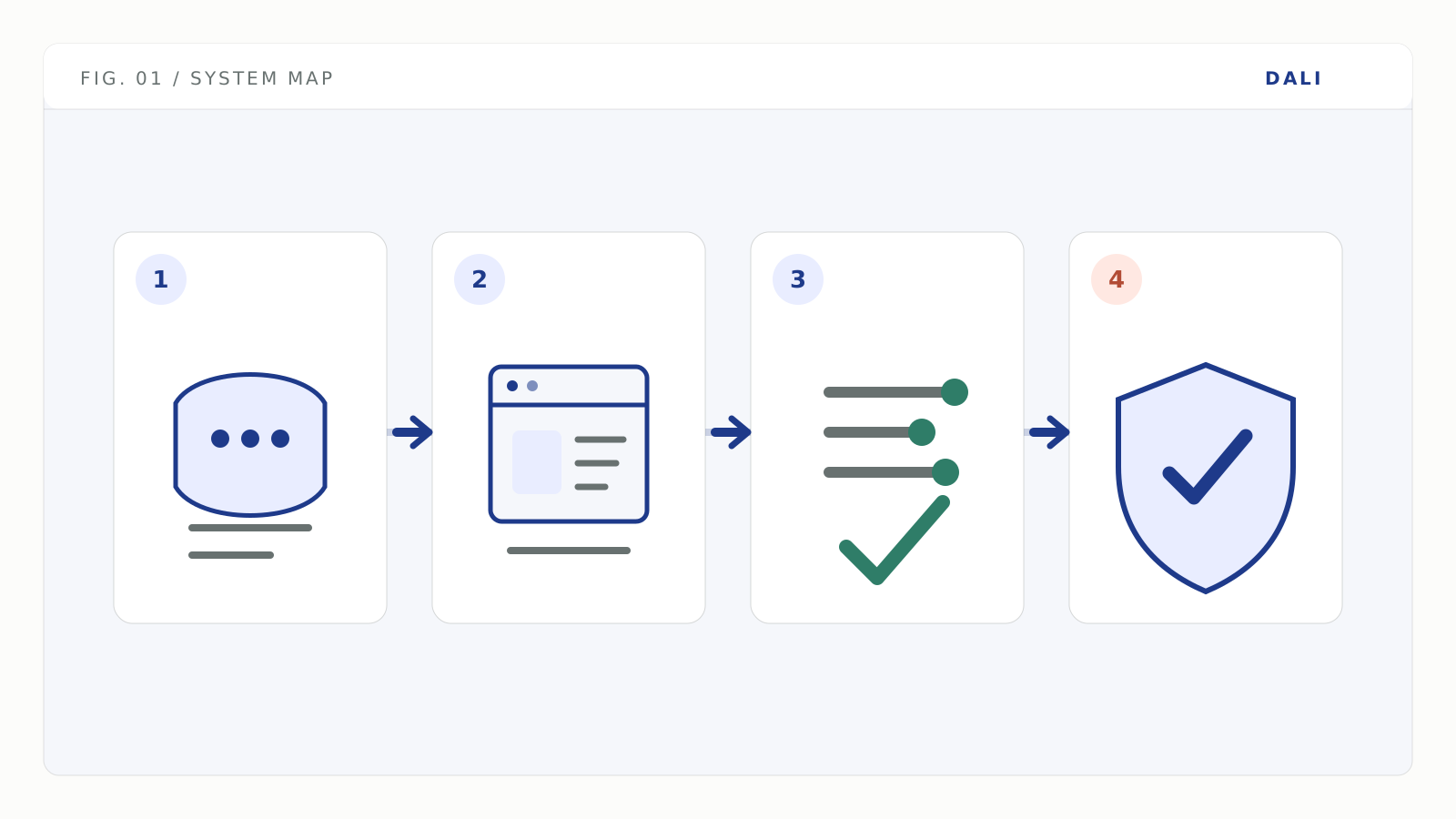
The fast loop creates a product surface; verification and production controls determine whether it is safe to rely on.
The first three stages are where the speed comes from. The fourth stage is where responsibility returns.
GitHub's guidance for reviewing AI-generated code recommends functional checks, validation against the intended architecture, dependency review, automated analysis, and human oversight (GitHub Docs). That is a useful baseline regardless of which AI builder produced the change.
Vibe coding vs traditional coding
| Dimension | Vibe coding | Traditional coding |
|---|---|---|
| Primary interface | Natural-language instructions and visual feedback | Source code, technical specifications, and direct implementation |
| First useful output | Often a working preview or narrow product slice | Often a designed and implemented module or feature |
| Main strength | Rapid exploration and iteration | Explicit control, maintainability, and predictable engineering practice |
| Main failure mode | A plausible surface hides unverified behavior | Delivery takes longer or over-engineers an unproven idea |
| Knowledge required | Product judgment, prompt clarity, and the ability to test what was generated | Software design, implementation, testing, deployment, and operations |
| Best fit | Prototype, proof of concept, internal tool, disposable experiment | Core systems, regulated workflows, complex data, high reliability, long ownership |
| Code ownership | Possible, but only if the team can inspect and maintain the output | Usually designed around explicit repository and maintenance ownership |
These are not opposing camps. A strong product team can use vibe coding for exploration and conventional engineering for the critical path.
What vibe coding is good for
Prototypes that answer one question
A prototype should reduce uncertainty.
Examples include:
- Will users understand this onboarding flow?
- Does the team want this dashboard layout?
- Can this API support the proposed interaction?
- Is the workflow useful before we invest in a full build?
If the prototype answers the question, it has done its job even if the implementation is later replaced.
Internal tools with bounded impact
A small internal tool can be a good fit when the user group is known, the data is non-sensitive, and a manual fallback exists.
The word "bounded" matters. A tool that can delete records, expose private customer data, or write to finance systems is not low-risk merely because only employees can open it.
Interface and workflow exploration
Vibe coding is strong at producing something concrete enough to discuss. Stakeholders can react to an actual flow instead of debating a document.
That makes it valuable for design sprints, usability testing, and early process mapping.
Disposable scripts and one-time transformations
AI-generated scripts can save time when the input is controlled, the result can be checked, and a failed run has limited consequences.
Run them on copies of data first. Do not give a one-time script broad production credentials because the task feels temporary.
Where vibe coding reaches its limit
Use risk, not visual polish, to decide when engineering depth is required.
| Product surface | Prototype may be enough when | Engineering gate is required when |
|---|---|---|
| Authentication | Fake users or a closed demo | Real accounts, password reset, sessions, roles, or social login exist |
| Database | Disposable sample data | Customer records, migrations, tenancy, retention, or recovery matter |
| Payments | Simulated checkout | Money can move, refunds can occur, or webhook events change business state |
| Admin tools | Read-only demo data | The interface can modify users, permissions, content, or system settings |
| API credentials | Mock responses | Real tokens, third-party accounts, or billable APIs are connected |
| AI features | Output is manually reviewed | The model can send, publish, update, approve, or deny something |
| Deployment | Temporary preview | Availability, backups, alerts, rollback, and ownership are expected |
OWASP's current web application risk list includes broken access control, security misconfiguration, supply-chain failures, authentication failures, and logging failures (OWASP Top 10:2025). These risks are not unique to AI-built software. They are easy to miss when the development loop is driven mainly by whether the preview looks right.
Is vibe coding safe?
Vibe coding can be safe for an appropriately scoped task. The workflow itself is not a security control and not a vulnerability category.
Safety depends on what the application can do and how the generated implementation is verified.
Use this minimum gate before connecting real users or real data:
- Access control: Enforce permissions on the server, not only by hiding buttons in the interface. OWASP recommends least privilege and deny-by-default access decisions (OWASP A01:2025).
- Secrets: Keep API keys and tokens in managed secrets or environment variables, never in browser code or a committed repository. Replit documents encrypted secret storage and warns against hard-coding credentials (Replit Secrets).
- Dependencies: Confirm that packages exist, are maintained, and use compatible licenses.
- Tests: Cover sign-in, permissions, money, destructive actions, and the main recovery path.
- Failure handling: Decide what users see when an API times out, a webhook arrives twice, or a database write fails halfway.
- Logs and alerts: Record enough to reconstruct an incident without logging sensitive values.
- Deployment: Separate the editor preview from the deployed environment, and use durable storage for durable data. Replit's publishing documentation, for example, describes deployment as a separate snapshot and advises against relying on the deployment filesystem for application data (Replit Publishing).
- Ownership: Name the person who can roll back, rotate a key, restore data, and decide whether the application stays online.
For the full sequence, use the vibe prototype to production checklist.
A better way to prompt a vibe-coded product
Do not ask for the entire product in one opaque jump. Build reviewable slices.
Use a sequence like this:
- Define the user and job. "A support manager reviews unresolved billing tickets each morning."
- Define the happy path. "Show the queue, open one ticket, and draft a reply from approved policy text."
- Define the boundaries. "Do not issue refunds, close accounts, or expose payment details."
- Define the exception path. "If the policy is missing or contradictory, route the ticket to a human with the source excerpts."
- Define the evidence. "Log the source IDs, draft, reviewer decision, and final action."
- Add one integration at a time. Verify each tool and permission before adding the next one.
This makes the generated system easier to inspect and gives the AI less room to silently invent architecture.
Keep, harden, or rewrite?
You do not need to rewrite every vibe-coded application.
Keep it
Keep the implementation when the code is understandable, the architecture fits the product, critical paths have tests, dependencies are acceptable, and the team can maintain it.
Harden it
Harden the existing application when the product logic is sound but the system lacks controls such as server-side authorization, secret management, tests, monitoring, backups, rate limits, or a safe deployment process.
Rewrite the critical path
Rewrite only the parts whose behavior or ownership cannot be trusted. Common candidates are authentication, tenant isolation, payment state, destructive admin actions, and data migrations.
The decision should follow evidence from the repository and running system. It should not follow embarrassment about how the first version was built.
What production readiness adds
Vibe coding can create the product surface and parts of the implementation. Production readiness adds the wrapper that makes the system dependable:
- scoped permissions;
- approval gates for risky actions;
- repeatable evals and tests;
- logs, traces, and alerts;
- retries and idempotency;
- rollout and rollback;
- a named operator and handoff documentation.
That is the same distinction explained in what is a production AI agent, although a vibe-coded application does not need to contain an agent.
For narrower fixes, see protecting API tokens, testing and CI/CD, and the vibe-coded site hardening checklist.
How Dali approaches vibe-coded products
Dali starts with evidence from the running product and repository. We map the critical paths, identify which parts are safe to keep, contain urgent exposure, and harden or rebuild only where the risk justifies it.
If you already have a working prototype, the useful next step is a production-readiness review, not an automatic rewrite. See solutions for the delivery model.
FAQ
The phrase became widely associated with Andrej Karpathy's description of building by giving natural-language instructions to an AI coding system and accepting the resulting code with limited direct inspection. Today people also use the term more broadly for conversational AI-assisted product development, so the intended level of code review should be stated rather than assumed.